Access with purpose.
Workspace permissions help keep documents and team activity available to the right people.
Create a document from a blank page or an AI draft, edit the PDF, guide clients through an application, and finish a signing envelope with a completed PDF and audit trail.
3 free envelopes during your 7-day trial · Card required at secure checkout
From the first draft to the finished agreement. Choose what you want to do and take a closer look.
What would you like to make easier?
Prepare the agreement, give every signer a clear next step, and keep the completed PDF and signing record together.
02 / TAKE A CLOSER LOOK
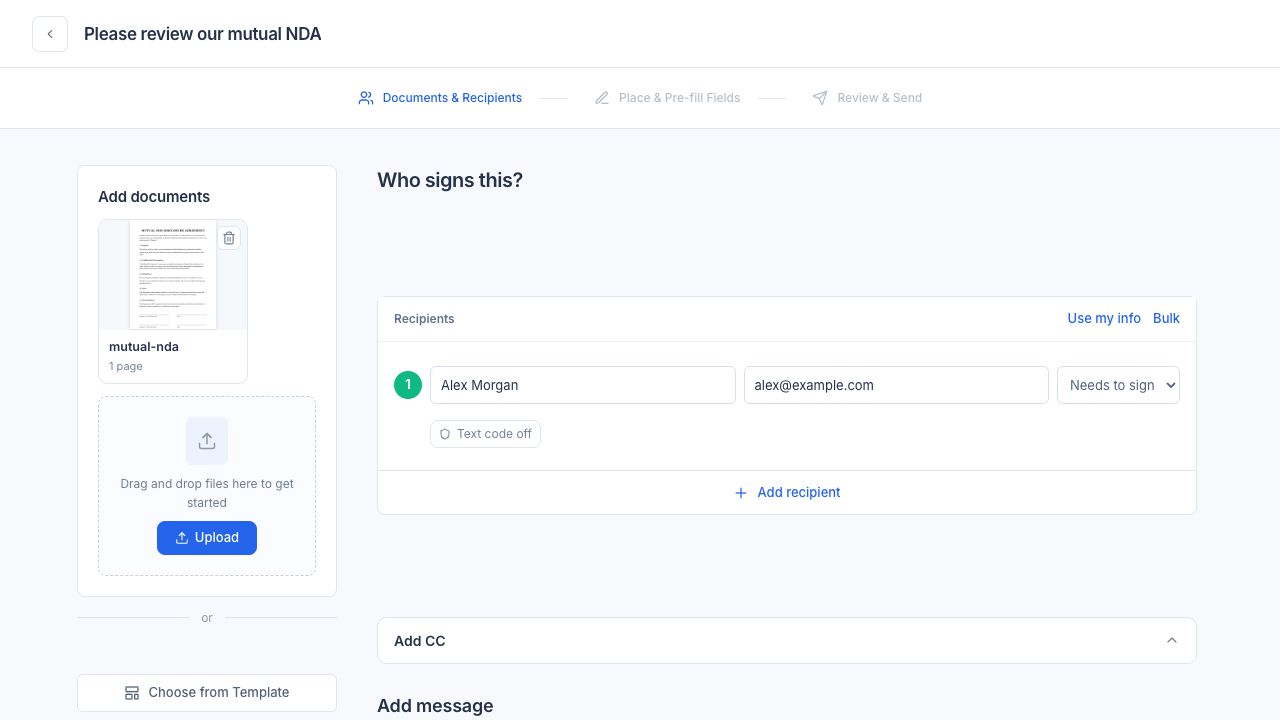
Actual product screens with sample data. Selecting a step sends no request and applies no signature.
Edit the text, bring files together and put every page in order. Prepare a document that is ready for its next step.
02 / TAKE A CLOSER LOOK
Three focused views of the same actual sample editor, before changes. Five free successful jobs per rolling hour across PDF tools; a free account is required to download. Paid plans include higher limits.
Arrange your document’s fields into a guided wizard or smart checklist. Help clients answer questions, attach files and finish with a signature.
02 / TAKE A CLOSER LOOK
Before-and-after design illustration and actual product screens with sample content. Website embedding depends on your plan and the published form mode.
Build a standalone form, share a public link or embed it on your website. Keep the responses and supporting files together.
02 / TAKE A CLOSER LOOK
Actual product screens with sample content. A typed acknowledgment on a standalone Web Form does not create a signing envelope or certificate.
Keep reusable templates, documents, contacts and team activity in one workspace. See what is ready, what is waiting and what comes next.
02 / TAKE A CLOSER LOOK
Actual PearSign captures with demo content, showing a demo template through setup and activation. Template limits and team features vary by plan.
Explore importing completed agreements and reusable templates, with explicit review for fields that need your attention.
02 / TAKE A CLOSER LOOK
Product preview; connector availability is subject to rollout. The included import window is 120 days; older history requires a separate one-time purchase. Normal storage allowances apply. Original certificates and audit records are retained; PearSign does not claim to have witnessed prior signing.
Bring a PDF into ChatGPT, prepare your changes and review what happens next. Sign for yourself or continue in PearSign to send to someone else.
02 / TAKE A CLOSER LOOK
Workflow guide, not a capture of the ChatGPT interface. No account is connected, no signature is applied and no email is sent. The feature page includes the interactive walkthrough.
Connect supported services, or use the PearSign API to send prepared documents, follow their status and retrieve completed PDFs.
02 / TAKE A CLOSER LOOK
Illustrative API workflow. No requests are made. Full language examples, authentication requirements and signed-webhook guidance are in the API reference.
Your workflow can include just the steps you need. Explore all products
Workspace permissions help keep documents and team activity available to the right people.
Retain the completed PDF and a completion record of signing consent and activity.
Certificate-based PDF signatures help detect changes after signing. Review the signature panel and evidence for each transaction.
7 days free with 3 envelopes. Card required. Then $4.99 for your first Starter month, renewing at $15/month unless canceled. Taxes may apply. Billed per organization.
DocuSign migration is currently in product preview. It covers completed agreements and reusable templates from an account you can access. You choose which items to bring over. Contact PearSign to check availability for your organization.
Supported fields map automatically. Fields with uncertain placement or unsupported behavior are flagged in red, with a suggested native field type where a clear match exists. Apply a suggestion or choose a field manually, check the signer, position and size, then explicitly mark it reviewed. Reviewed imports become drafts in Templates for you to activate.
Completed agreements appear in Documents → Imported in your organization’s workspace, with personal and organization views controlled by your permissions. Templates are added as drafts in Templates after mapping review. Review and activate a template there before reusing it.
The original downloaded signed PDFs, DocuSign completion certificates and audit records are retained unchanged with the imported agreement. Importing does not create a new PearSign completion certificate or mean that PearSign witnessed the original signing.
The included import window covers agreements completed in the previous 120 days. Older history requires a one-time migration purchase, and normal storage allowances apply. The 120-day cutoff limits the included import window; it does not delete documents you have already imported.
Yes. Save a document with its reusable fields and signer roles, then use it as the starting point for future requests. You can update the document and recipient details before sending. Template limits and team features depend on your plan.
Yes. Finish your changes and preview the result first, then create a free account or sign in to download. You get five successful PDF jobs per rolling hour, shared across all tools. Re-downloading the same result does not use another job. Paid PearSign plans include higher limits.
Eligible active, published guided wizards can be embedded on an allowed website using an automatic-height script or iframe fallback. Configure completed-form recipients from the template's Embed on website option. Availability depends on your plan and form mode.
Install the PearSign plugin in ChatGPT and connect your PearSign account. Select a PDF inside the editor, place your fields, review, and explicitly confirm to sign it yourself. For another signer, prepare blank fields in chat, then continue on PearSign to add recipients, review, and send. Preparing fields in chat sends no email. The website also has a separate interactive demo using sample data.
AATL is the Adobe Approved Trust List. It concerns the trust chain of the certificate used to sign a PDF, not an independent certification of PearSign's platform. A certificate-based PDF signature helps detect changes after signing; the trust result depends on the certificate used, its validation status and the reader's settings. Review the PDF's signature panel and the signing evidence for your transaction.
An electronic signature records a person's intent to sign, such as typing a name or drawing a mark. A digital signature uses a certificate and cryptography to help verify document integrity and the certificate holder. PearSign records electronic signing activity and supports certificate-based PDF signatures. A document seal alone does not prove a recipient's identity; authentication and signing evidence also matter.
No. Recipients sign from a secure link in their browser or on mobile; no account, download, or app install required. The signer completes any fields, provides consent to sign electronically, and the finished document is returned to your PearSign workspace, sealed and audit-trailed.
You describe the document you need and PearSign's AI produces an editable first draft and suggests where signature and data fields should go. The draft is a starting point to speed you up; it is not legal advice. You review and edit everything before sending, and you remain responsible for the final content.
PearSign offers a 7-day trial with 3 envelopes and a card required at secure checkout. Unless canceled, Starter costs $4.99 for the first month, then $15/month. Taxes may apply. Paid plans add higher volume, longer document retention, and additional features. An envelope is a document or set of documents sent for signature.
Your documents, forms and signatures.
All together in PearSign.
3 free envelopes during your 7-day trial
Card required at secure checkout